
Paper Poster Instructions and Information
IMPORTANT INFORMATION
- Poster Authors must bring their printed poster to the Conference. There are no facilities onsite to print posters.
- Do not leave anything on the floor near or under the poster board once it is set up. Anything on the floor is a safety hazard.
Authors are encouraged to stand by their poster board during their assigned Poster Networking Hour to engage with attendees and answer questions.
POSTER MOUNTING & DISPLAY TIMES
Posters Shift 1:
- Mounting: Thursday, October 22 (from 08:00 AM)
- Dismantling: Friday, October 23 (must be removed by 05:00 PM)
- Poster Networking Hour I (Poster Area, Skalkotas Foyer): Thursday, October 22, 12:30 PM–01:30 PM
Posters Shift 2:
- Mounting: Saturday, October 24 (from 08:00 AM)
- Dismantling: Sunday, October 25 (must be removed by 03:15 PM)
- Poster Networking Hour II (Poster Area, Skalkotas Foyer): Saturday, October 24, 05:25 PM–06:30 PM
Please note: We are not responsible for posters left after your assigned shift. Any posters remaining after 03:15 PM on October 25 will be discarded.
POSTER BOARD NUMBERS
- Your assigned poster board number will be sent to you via email prior to the conference.
POSTER FORMAT AND TECHNICAL SPECIFICATIONS
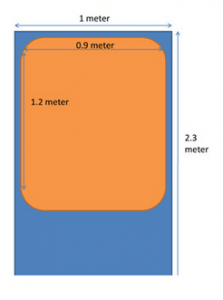
- Poster Board orientation: PORTRAIT (VERTICAL)
- Poster Board Size: 1.0 m width x 2.3 m height
- It is recommended that your poster be 90 cm wide x 120cm high.
- The text, illustrations, etc. should be bold enough to be read from a distance of two meters (~2 meters / 6 feet).
- Select colors that provide enough contrast between the text, images and background, so that text and images are legible for anyone with low vision or color deficiencies. Avoid green on red and red on green.
- Allocate the top of the poster for the title and authors as stated on the submitted abstract.
- An introduction should be placed at the upper left and a conclusion at the bottom, both in large type. See Poster template diagram.
- Posters must NOT have company logos nor commercial messaging. Institution or hospital logos are fine.
- If using QR codes, please note that they must not link to commercial content or images.
- All financial disclosures must appear on your poster displaying the information you supplied in your submitted Conflict of Interest form.
- Double-sided tape will be available in the poster area for hanging of posters. Staff will also be in the poster area to assist you.
- You also have the option to upload an electronic version of your poster for viewing on the conference app and on-site stations. For full upload guidelines and technical requirements, please refer to the E-Poster Upload Instructions Page.